

If your affiliate income is close to zero, the reason may be simple: readers never visit the pages where your affiliate links are. You have traffic. Your how-to posts rank, and people read them. So you probably decided your writing isn’t good enough.
Hold that thought. Your money pages may be fine. Nobody can get to them.
So you rewrote the reviews. You sharpened the pitches and polished the calls to action. All that effort went into pages with no road leading to them. Your top-of-funnel posts sit in content silos, each one a dead end, and the longer that goes on, the more the whole blog feels broken. It isn’t. Only the route is.
No sales is a directions problem, not a writing problem. This post shows you how to find the exact break in your reader journey and fix it: where internal links are missing, where contextual links should sit, and where a conversion funnel leak is quietly sending readers away. You can run every check free, on your own blog.
This post shows you the break; the Reader Journey Leak Audit walks your own pages through the same check.
Checking Every Post by Hand Doesn’t Scale
You could fix this by opening every post and checking for missing routes. But that is slow, and it’s easy to get wrong. You check the posts you remember. You miss the ones you forgot. And even when you finish, you still can’t see the whole journey at once. You only see pieces. That’s why I built the free Reader Journey Leak Audit, which walks your reader’s journey from first click to purchase and finds the one break between your traffic and your affiliate sales. It gives you one clear place to look. Instead of guessing which posts to patch, you see the exact spot where readers stop. Fix that one thing first. Grab your copy below.
Table of Contents
Why Low Affiliate Sales Isn’t Always a Content Problem
Let me describe the most skeptical version of you.
You work all day, then write at night. You’ve read the advice. You’ve watched your numbers for months.
Your conclusion feels logical: “Sales are low, so my content must be weak.” That story has a clean cause and a clean fix. You rewrite the reviews, sharpen the pitch, and add more pros and cons.
Here is the problem. That story assumes readers are reading your reviews.
Nobody checked that part.
Almost all affiliate advice works inside this same frame. It says no sales means a persuasion problem: low traffic quality, weak copy, or the wrong products.
Every one of those answers starts after the reader lands on a money page. If the reader never lands there, the whole debate is about an empty room.
Why Do Readers Never Visit the Pages Where My Affiliate Links Are?
Often, readers never visit your affiliate link pages because nothing sends them there. Informational posts answer a question, then end with no route to a review, comparison, or buying guide. The cause is a missing path between content types, not weak writing. Add contextual links and clear calls to action to fix it.
Think about how most affiliate advice is built. It tells you to watch affiliate link clicks. It tells you to watch conversion rate on your review pages.
Those numbers only count people who arrived. They say nothing about the people who didn’t. That is a conversion funnel leak your review-page reports can’t show you.
Here is a made-up example to show the logic. These numbers are not real data.
Say 1,000 people read your post on “how a standing desk works.” Say 5 of them ever open your standing desk review. Say 1 of those 5 clicks a link.
Your click-through rate on the review looks like 20%. That is strong. But the real story is that 995 readers never saw the page.
Your review didn’t fail. It was never given a chance.
So the first question is not “why don’t my pages convert?” That question is too early.
The first question is “do my readers ever get there?”
Why Informational Posts Don’t Send Traffic to Review Pages
Think about why someone lands on your blog. They typed a question into a search box.
“How does a standing desk work?” is an informational search. The person wants an answer. They are not ready to buy.
Your post gives the answer. The reader says thanks, in their own quiet way, and closes the tab.
That is not a failure. That is a post doing its job well. Informational posts attract top-of-funnel readers, and those readers have not yet moved to commercial intent.
But here is what happens next on most blogs. Nothing happens next.
The post ends. No road leads onward. The reader’s question was answered, so they leave.
This is the real reason informational posts don’t send traffic to review pages. It isn’t that readers refuse to go. It’s that nobody pointed.
The same gap explains a lot of familiar complaints:
- Why visitors ignore my affiliate review pages
- Why no one visits my buying guides
- Why my monetized pages get no traffic
- Why readers leave before seeing my affiliate links
- Why my blog traffic doesn’t reach my product pages
These sound like five different problems. They are one problem: a missing road.
Why Affiliate Pages Get Ignored: It’s a Directions Failure
Let me say it plainly. Low affiliate sales is not a verdict on your writing.
It is often a directions failure. Your blog has two kinds of pages that never talk to each other.
One kind is top-of-funnel content. These are the how-to posts and explainers that bring in readers.
The other kind is your money pages. These are the reviews, comparisons, and buying guides where your links live.
On many blogs these two groups sit in separate content silos. The traffic pages feed on search. The money pages sit in the back, waiting. The broken path between them is an internal linking gap, and it is why traffic never lands on your commercial pages.
Think of a shop on a street no one walks down. The goods might be excellent. The shop still stays empty.
You would not fix that by repainting the sign. You would build a path from the busy street.
That is what the rest of this post is about.
How to Check Your Exit Rate, Behavior Flow, and Internal Links
You don’t have to trust me. You can test this tonight with free tools, in about ten minutes. Each check below tells you something you can see in your own data.
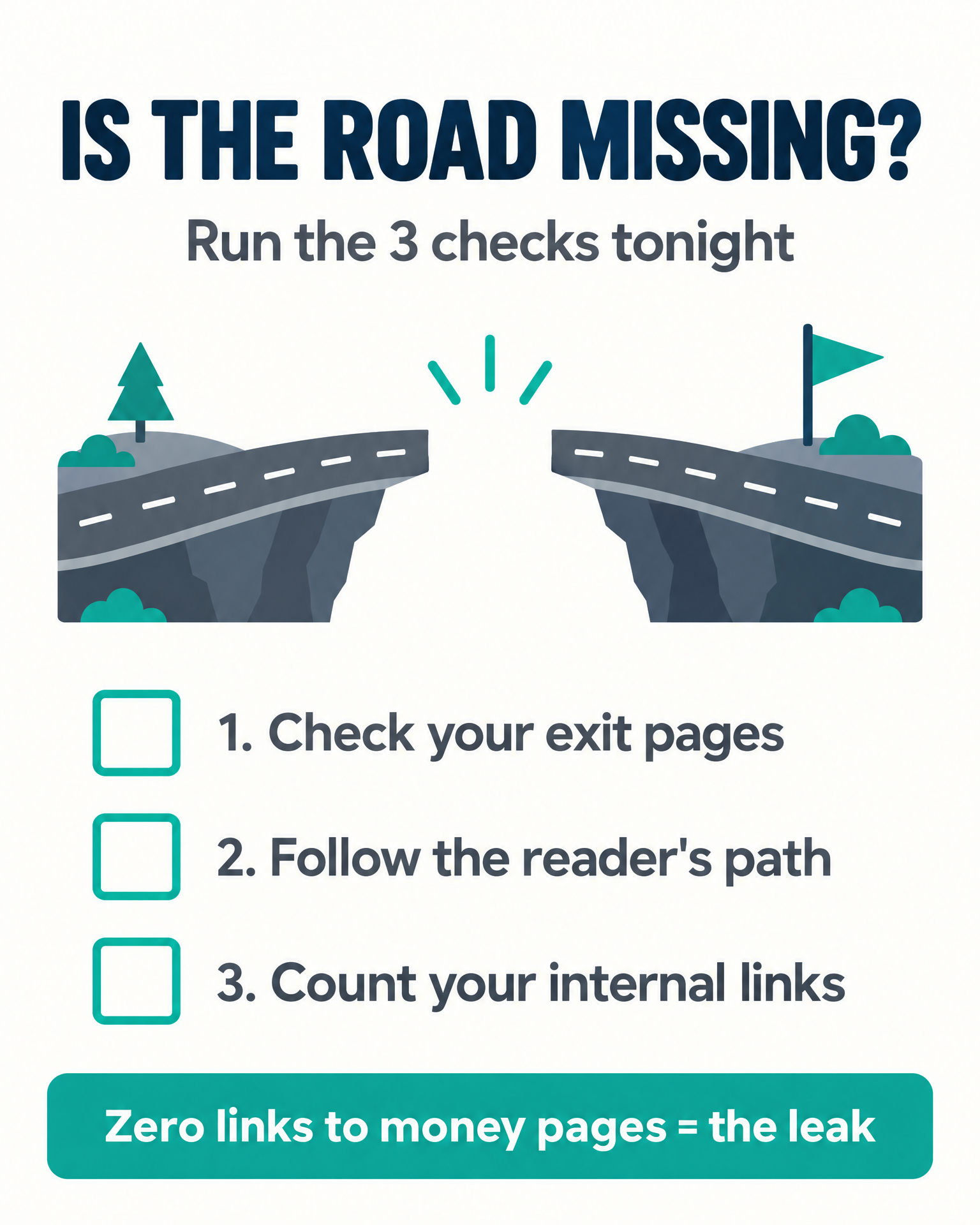
Check 1: Look at your exit pages.
Open your analytics and find the pages where readers leave. Look at the exit rate and bounce rate on your top informational posts.
If your best-ranking posts are also your top exit pages, readers are finishing and leaving. That is the dead end showing itself.
Check 2: Look at the reader’s path.
Open the behavior flow or path exploration report in Google Analytics. Start from your top informational posts. See where readers go next.
Most will show “exit” or nothing. Look for any arrow pointing to a review or buying guide. If you can’t find one, you have your answer.
Also check pages per session. A number near 1 means most readers see one page and leave.
Check 3: Count your links.
Open your top five informational posts. Count the internal links in each one.
Then count only the ones that point to a review, a comparison, or a buying guide. Be honest. Links to other how-to posts don’t count. If you aren’t sure where a link goes, hover over it and read the address shown at the bottom of your browser.
Many bloggers find the number is zero. Some find one link, buried in the footer area of a long post.
If you get zero, don’t feel bad. You just found the leak.
What a Healthy Reader Journey From Blog Post to Money Page Looks Like
Now let’s compare a dead end with a working route.
A dead end looks like this. The reader finds a post, gets the answer, and reaches the last paragraph. The post closes with a vague “thanks for reading.”
A healthy route looks different. The reader finds the same post. Midway, their question shifts from “how does this work?” to “okay, which one should I get?”
Right at that spot, the post names the page that answers the new question. The reader clicks. They land on a product comparison page built for exactly that moment, where they can weigh the options side by side.
Notice what changed. The content didn’t get better. The post just stopped abandoning the reader at the moment of need.
Search intent explains this. Readers start with an informational need and often reach a commercial one in the same visit. A good internal link strategy meets them at that shift and offers the next step.
A simple form of content funnel mapping helps here. Write down each informational post. Next to it, write the money page that a curious reader would want next.
That list is your map. Everything below is how to build the roads.
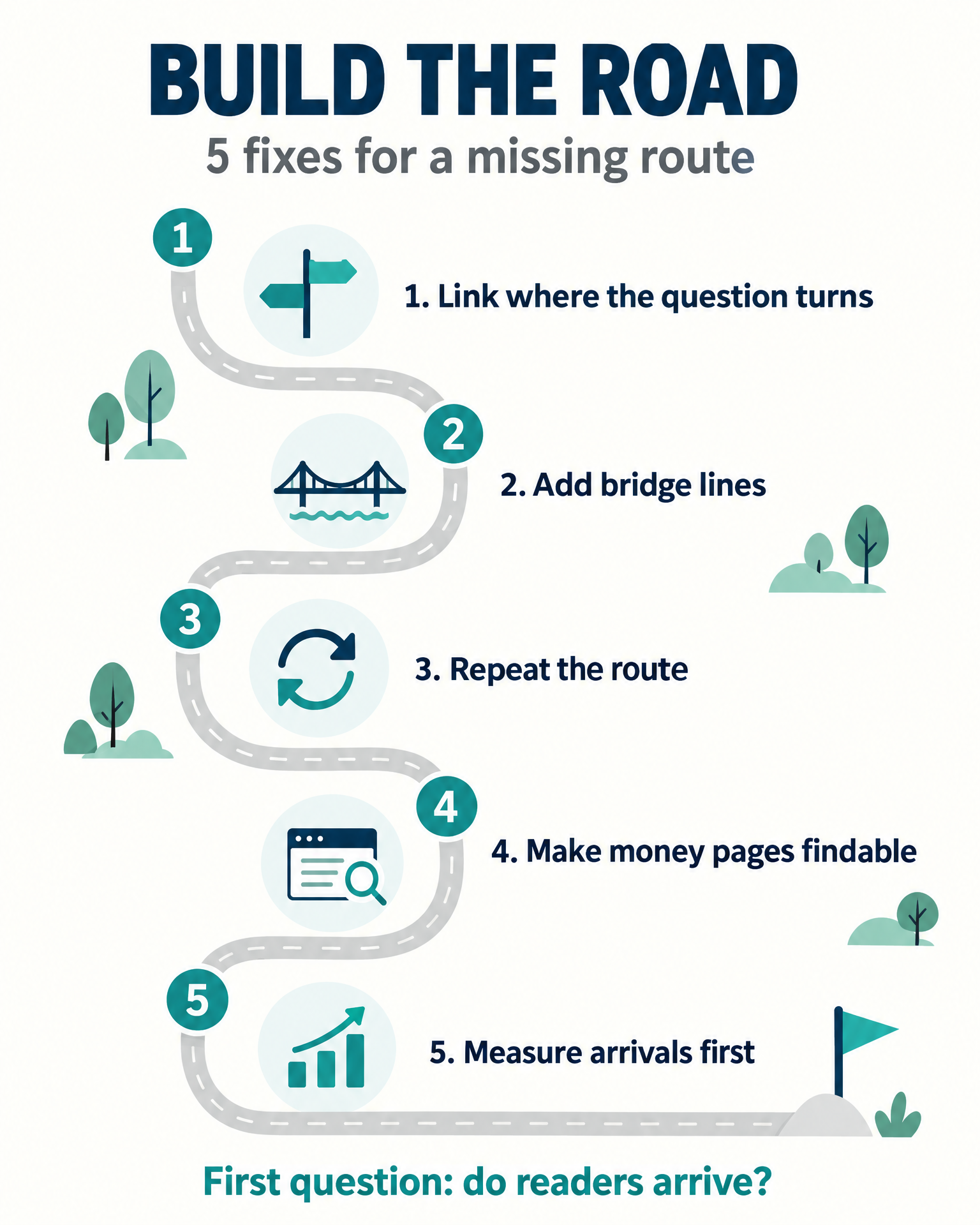
Fix 1: Add Contextual Links to Review Pages Where the Question Turns
Start with posts that already get traffic. These are your best chances, because readers are already there.
Open each post and find the sentence where “how does this work?” becomes “which one should I get?” It usually sits right after you explain the basics or list the options.
Add a contextual link at that exact spot. Put it inside the sentence, not in a block at the bottom.
Use honest anchor text. Name the destination plainly.
- Good: “our comparison of standing desks under a set budget”
- Good: “the buying guide for beginner cameras”
- Weak: “click here”
- Weak: “this post”
Clear anchor text tells the reader what they’ll get. It also tells search engines what the target page is about. That is anchor text optimization in plain words.
Honesty matters here. Don’t promise a page that doesn’t deliver. Reader trust and intent both depend on it.
Fix 2: Write Bridge Lines That Work as Calls to Action
A link alone is easy to skip. A bridge line gives the reader a reason to click now.
A bridge line is a short passage. It names the money page and says what the reader gains.
Here are two made-up examples:
- “If you’re ready to choose, I compared the top three side by side here.”
- “Not sure which size fits your space? The buying guide walks through it step by step.”
Keep it short. Two sentences at most. One clear reason.
Place bridge lines where the reader’s attention is high. Check your scroll depth data and a free heatmap tool. They show where readers stop engaging. Put the bridge just before that drop.
Weak calls to action fail to prompt navigation. A good bridge line is a call to action that sounds like help, not a pitch.
Avoid stacking a content upgrade or email box at the same spot. Two offers at one moment split the reader’s attention. Give the route to the review page its own space.
Fix 3: Repeat the Route With Pillar and Cluster Pages
One link in one post is not a path. It is a single stepping stone in a river.
The same destination should be reachable from several related posts. If you have a review of a product, link to it from every post that touches that topic.
Think in pillar and cluster pages. Your buying guide is the pillar. Your informational posts are the cluster around it.
Each cluster post sends readers up to the pillar. The pillar can link back down to the posts that go deeper.
Here is a simple way to do it in one evening:
- Pick one money page.
- List every post on your blog that relates to it.
- Open each one and add a contextual link and a bridge line.
- Move to the next money page.
A batch of five to ten posts is realistic for an evening or two. You don’t need to touch the whole blog at once.
Fix 4: Improve Site Architecture So Money Pages Are Easy to Find
Contextual links are the main road. Your site architecture should add side roads.
Look at your navigation menu. Can a new reader find your reviews and buying guides in one click? If the menu lists only categories of how-to content, the money pages are hidden.
Add a clear menu item for your best buying guides or comparisons. Use a plain label readers understand.
Next, check your related posts area. Many themes pull in random posts by date or tag. Make sure the related posts widgets on your informational pages can show your review and comparison pages too.
You can also use a sidebar or an in-content banner. Keep it simple and relevant to the topic of the post. A banner about cameras belongs on camera posts, not everywhere.
Each of these is a small change. Together, they turn a hidden room into a visible one.
Fix 5: Track Visits to Money Pages Before You Track Sales
Here is where most people go wrong again. They add links and then check sales after one week.
Sales are the last step. Measure the first step first. Write down the date you made your edits, so you can compare the same posts before and after.
After you add your routes, watch these:
- Pages per session: Is it going up on the posts you edited?
- Behavior flow: Do arrows now point from those posts to money pages?
- Exit rate: Is it dropping on the informational posts?
- Visits to money pages: Are they rising at all?
If readers now reach the money pages, the road works. Only then does it make sense to look at affiliate link click tracking and conversion rate optimization.
If readers reach the pages and still don’t click or buy, that is a different problem. It has its own fixes, and they belong in another post. Don’t mix the two.
Take it one stage at a time. First, do readers arrive? Second, what do they do once there?
Stop Rewriting. Start Routing Readers to Your Money Pages.
Why do readers never visit the pages where your affiliate links are? Because nobody built them a road. Rewriting the review won’t build one.
Your reviews might be fine. You can’t know until readers get there.
So leave the rewrite alone tonight. Open your best-ranking how-to post, add one contextual link to your best review at the spot where the question turns, and write one bridge line under it.
Products / Tools / Resources
- Reader Journey Leak Audit (free): Find the one break between your traffic and your affiliate sales — the fillable audit that walks your reader’s journey from first click to purchase and shows you exactly where the road is missing. Get the free Reader Journey Leak Audit.
- A blank note or spreadsheet: The funnel map from this post. Every informational post down one side, the money page it should route to beside it, and a check mark for each road you build.
- Blog Traffic but No Affiliate Sales? 6 Leaks to Fix (companion guide): The wider leak map for this stage of the blog — the other breaks worth checking once your readers can actually reach your money pages. Read the companion guide.