

Your informational posts rank. People find them. Search Console shows real clicks.
Then your review pages sit empty. Your comparison post gets a trickle. The commissions don’t show up.
So you do what everyone says. You write another post. You chase another backlink. Every new visitor lands on a page with no road to a money page.
The effort is real. The routing is missing.
This post fixes the routing. It is a step by step internal linking plan to send more traffic to affiliate money pages, using the posts you already have. And if you want a worksheet to run it on every post, the free Search Visibility Action Planner is the ideal companion.
What Doing This By Hand, Post by Post, Really Costs
You can do this prioritization on your own. Open a post, guess which review fits, add a link, and move on.
But guessing costs you. You link to the wrong page. You skip the posts that matter most. You redo the same thinking forty times.
The Search Visibility Action Planner is the worksheet version of the prioritization step in this plan. You diagnose the signal in your search performance report. You prioritize the page that deserves the traffic. You choose the next move.
Then you run that same sequence on every post. You stop improvising.
Table of Contents
Why Your Blog Traffic Isn’t Reaching Your Money Pages
Here is the belief that keeps you stuck: “I need more traffic before the money comes.”
It sounds sensible. More visitors should mean more clicks. More clicks should mean more commissions.
But look at what that belief assumes. It assumes your current visitors have nowhere better to go. It assumes the leak is at the top of the funnel.
It isn’t. The leak is in the middle.
Think about a typical informational post. A reader searches a question. Google sends them to your answer. They read it, get what they need, and leave.
That post is a dead end. No road leads from it to a review, a comparison, or a buying guide.
Informational posts attract search visitors who are early in their research. Dead-end posts waste the traffic that could reach your affiliate pages.
More traffic into a dead end doesn’t help. It just gives more people a chance to leave.
If your informational posts get traffic but no affiliate commissions, this is why. Nothing sends that traffic to your money pages.
Here is a simple way to picture it. Say you own a shop on a busy street. People walk in, look around, and walk out. You don’t need a busier street. You need a path from the door to the register.
Your informational posts are the door. Your money pages are the register. Right now, there is no path.
Why Total Sessions Don’t Measure Click-Through to Money Pages
Most affiliate bloggers track three things:
- Total sessions
- New posts published
- Backlinks earned
All three measure the top of the funnel. They tell you how many people showed up. They tell you how hard you worked.
None of them tell you whether anyone moved toward a page that sells.
That is the only movement that pays. A reader goes from a post they found to a page that recommends a product. That reader journey is where affiliate conversions start. Everything else is just visibility.
Here is a made-up example to show the logic. These numbers are invented, not real data.
Say a post gets 1,000 visits a month. Say none of those readers click through to a money page. Your click-through to money pages is zero.
Now say you double the traffic to 2,000 visits. Zero clicks still means zero. You did twice the work for the same result.
Now go the other way. Say you leave traffic at 1,000. You add a route, and 50 readers click through to a review. That is 50 people who could buy.
You didn’t need more traffic. You needed a path.
This is why the old debate goes in circles. People argue about content volume versus backlinks versus quality. Every side measures visibility.
Nobody asks where the visibility goes. The whole argument runs on the wrong question.
How to Turn Existing Blog Traffic Into Affiliate Clicks
Drop “How do I get more traffic?”
Ask this instead: “Where does the traffic I already have actually go?”
That question has an answer. You can find it in minutes with free tools. And once you see it, the old objections lose their grip.
“But I need more content first.” You already have content that ranks. Route it.
“But backlinks build authority.” Authority does you no good if it sits in dead-end posts. Internal links pass link equity from the pages that earned it to the pages that pay.
“But internal linking is a minor tweak.” A tweak that turns zero clicks into real clicks is not minor. It is the missing piece of the reader journey.
You don’t need to defeat these objections. They answer a question you’ve stopped asking.
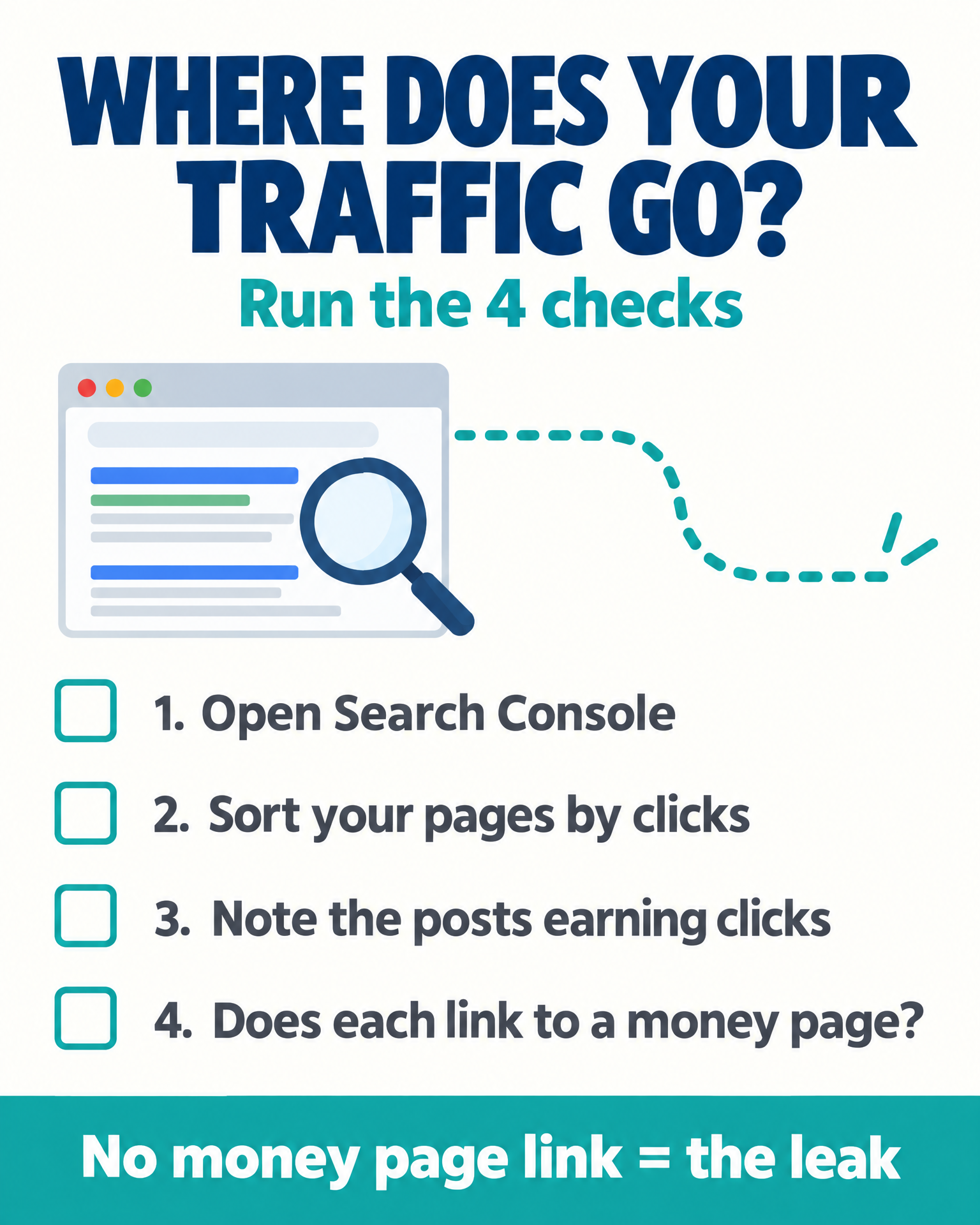
Here is a quick internal linking checklist to see where your own traffic goes right now:
- Open the Search Console search performance report.
- Sort your pages by clicks.
- Note which informational posts already earn impressions and clicks.
- Look at each one. Does it link to any money page?
For most affiliate bloggers, the answer is no. That is your leak.
If your posts show impressions but little movement, read this breakdown of Search Console impressions with no traffic. That is a different problem. This post stays on routing.
Step by Step Internal Linking Plan to Send Traffic to Money Pages
How do I send my blog traffic to my affiliate pages?
To send blog traffic to affiliate money pages, audit the posts that already earn clicks, rank your best review and buying guide pages, match each post to one page by search intent, add a contextual link with clear anchor text and a call-to-action block, then fix dead ends and orphan pages and re-measure click-through to money pages.
This plan works for one person with a full-time job. Each step fits in a short session. You do a batch of posts at a time, not the whole site. It is a method for routing traffic you already earn. It does not promise a result by a set date.
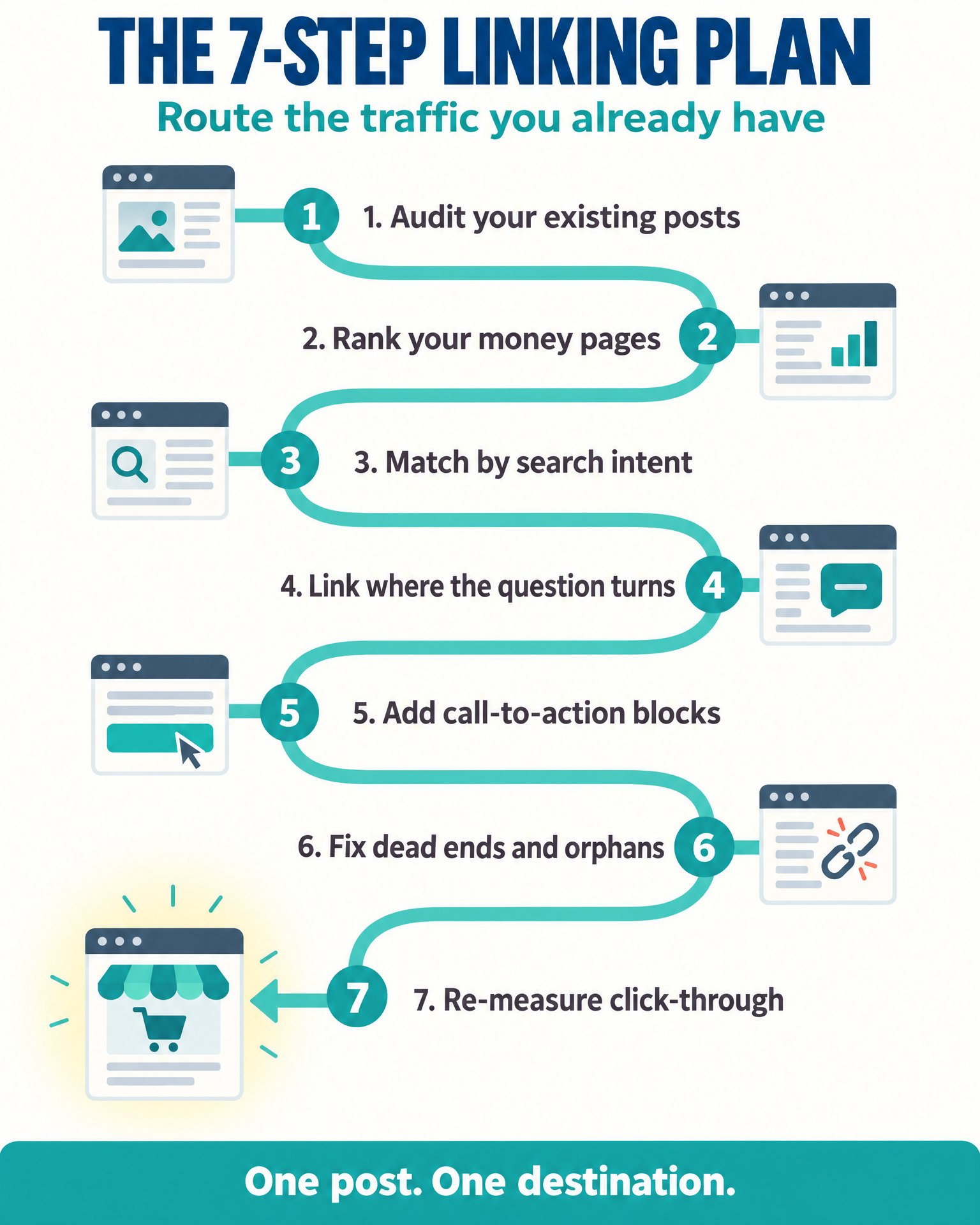
Step 1: Run a Content Audit of Your Existing Posts
Start with your search performance report. A content audit identifies the posts that already earn visibility. List every post that earns impressions and clicks.
Put them in a simple spreadsheet. This is your content inventory. Give each row a role: traffic earner or money page.
The traffic earners are your starting points. They already hold the visibility you want to route. This is also how you connect old blog posts to your money pages. You can’t link what you haven’t listed.
Step 2: Rank Your Affiliate Money Pages
Don’t link to everything at random. Pick the pages that deserve traffic first.
Look at your product review posts, comparison posts, and buying guides. Ask which ones are strongest. Ask which ones you’d be proud to send a reader to.
Rank them. The top few get the first links.
A page that isn’t ready for readers shouldn’t receive them yet. Fix it first. If you’re unsure whether to fix or replace it, this guide on when to update an old post instead of writing a new one helps you decide.
Step 3: Match Each Informational Post to One Money Page by Search Intent
This step needs the most thought. Search intent decides the match. It is how you link informational posts to product reviews and buying guides without sending readers somewhere that doesn’t fit.
Ask what the reader was researching when they found your post. Then pick the money page that is their natural next step, the one that meets the commercial intent that comes after the question.
Here is a made-up example. A post called “How to Start a Vegetable Garden” attracts beginners. A review of a beginner raised-bed kit fits that reader. A review of a commercial greenhouse does not.
The product has to be the next step, not just a related topic. One post, one destination. Don’t scatter the reader’s attention.
Check yourself: if you can’t say in one sentence why this reader would want that page next, pick a different page.
Step 4: Place Contextual Links Where the Question Turns
Read the post and find the moment where the reader shifts. They stop learning and start choosing.
That is where your contextual link goes. Put it inside the body text, right at that turn. Link placement matters more than link count.
Your anchor text matters here. It should name what the destination offers. “Our review of beginner raised-bed kits” tells the reader what they’ll get. “Click here” tells them nothing.
Clear anchor text also tells search engines what the destination page is about. Readers and Google both know where the link goes.
Step 5: Add Call-to-Action Blocks
Sometimes a plain link is too easy to miss. Readers skim.
Add a short, highlighted block near the turning point. Keep it to one or two sentences. Point it at the same money page as your link.
Don’t add a second destination. Don’t pile on offers. One post, one next step, repeated clearly.
Step 6: Fix Dead-End Posts and Orphan Pages
Every informational post that earns traffic needs a route onward. End each one with a clear next step. This is how you stop readers from leaving your blog posts without clicking an affiliate page.
Don’t rely on the related posts section alone. Those widgets often point to other informational posts. That keeps readers in the shallow end.
Now look for orphan pages. These are money pages that nothing links to. A site crawl shows them fast. By hand, check each money page and ask whether any post points to it.
Orphan pages have no internal links pointing to them. Adding links to them is some of the easiest link work you’ll do.
If you’ve built topic clusters or pillar pages, use them. Let each cluster of related posts feed readers toward one money page. The cluster and the money page support each other.
Step 7: Re-Measure Click-Through to Money Pages
Don’t check total traffic. It tells you nothing about this work.
Check click-through to money pages. Are readers now arriving at your reviews and guides at all? Open Search Console and your analytics. Compare the money pages before and after. To keep the comparison fair, use the same pages over the same number of weeks on each side of your edits.
Give it time. Don’t promise yourself a result in a week. Look for movement in how readers travel, not in the headline number.
Easy Internal Linking Workflow for Affiliate Bloggers With No Time
You don’t need a free weekend. You need a repeatable plan.
Here is a simple rhythm:
- Session one: Build the inventory from your search performance report.
- Session two: Rank your money pages and match them to traffic posts.
- Session three onward: Add links and call-to-action blocks to three to five posts at a time.
Each session is small. Each one makes your site a little less leaky. A repeatable plan lets busy bloggers add links in small time blocks, in whatever spare time they have.
This is the beauty of low-effort link updates. You don’t write anything new. You don’t wait for Google to find a fresh post. You edit pages that already exist and already have readers.
New posts need to be found. Links inside old posts get used the day they go live.
Your posts that sit on page two are a separate matter. If that’s your situation, see this guide on blog posts stuck on page 2 of Google. The plan above is for posts that already earn visitors.
Stop Feeding the Leak: Link Your Posts to Your Money Pages
Your readers already showed up. They found you on their own, with a question, and some of them were close to a decision. You handed them an answer and a closed door.
Another post won’t fix that. Neither will another backlink. Both just send more people to the same dead end.
A step by step internal linking plan is a few edits to pages you already own. The road costs less than the traffic you keep paying for.
Open your search performance report now, pick your best-earning post, and add one honest link to the money page its reader would want next, right where learning turns into choosing.
Products / Tools / Resources
Everything in this plan uses free tools:
- Google Search Console: Use the search performance report to find which posts already earn impressions and clicks.
- A spreadsheet or doc: Build your content inventory here. List each post, its role, and its matched money page.
- **Search Visibility Action Planner:** A free worksheet that walks you through diagnosing the signal, prioritizing the page, and choosing the next move.